Attention non-artists who commission artists: don’t fuckin do this???
Actually had someone do this to me too. Was doing a art stream, it took me over 2 hours to do his inked commission, he got a refund cause ‘it took too long’ that he figured I wasn’t going to do it after I gave him the file.
Don’t do this. Do not.
I’ve had this happen to me with a $350 comic I had already finished it, it was full color, 6 panels and had a full bg in every panel. I was lucky in that I didn’t spend him money yet, but it left me without funds. I’ve also had the above happen to me as well.
Don’t do this shit to artists. We’re people too. Drawing for you is more than a hobby. It’s a job.
Use Paypal Invoices.
I cannot stress this enough. That shit helps A LOT when it comes down to Paypal refunds/disputes.
There’s a description box that let’s you put in what the product is/how long it’ll take/yadda yadda, and then there’s another little memo box that only you and paypal can see where you can say it’s a digital commission and doesn’t require shipping (So Donald Mcfuck can’t say that they never got their commission).
And there’s also a box for your Terms & Conditions where you can say, if you have any conflicts/want a refund – email me, or you can actually tell the user that this is a digital commission and they won’t be getting a hard copy of it.
ARTISTS. PLEASE USE PAYPAL INVOICES. it will SAVE you. And to: the people who do this to artists – Fuck you. It’s okay if you change your mind and want a refund. But freaking TALK to us and let us know what’s going on. Let us WORK with you.
ALSO A HUGE TIP: Invoices paid will automatically set up a shipping notice which, if not fulfilled, can land you in SERIOUS hot water with PayPal. Since a lot of artists don’t print and ship the commissions, this is a huge problem.
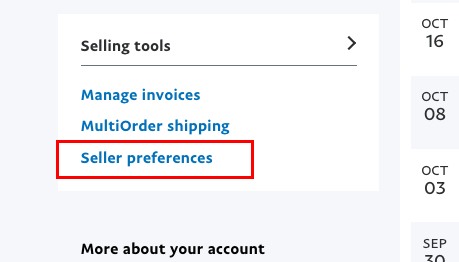
However! Totally manageable. Just go to your PayPal, scroll down to find Seller Preferences
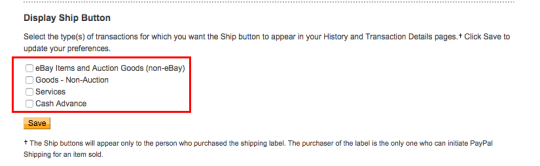
>> Shipping Preferences
>> Display Ship Button. Make sure all the boxes are unchecked. Then you’re all set!
As a big supporter of artists, don’t you ever fucking dare fuck over an artist like that. Like don’t. And if they take their time to do a good job, don’t shit all over them for it! Don’t be a fucking ass hole. Just don’t. These people put a LOT of work and time and effort into their artwork. Just don’t be that guy. Often times these artists aren’t even getting what they deserve in compensation.
I am very grateful my customers have been good to me, but I’m spreading the word.
Very important!
As a new artist, I’m very grateful for this post. Never knew this. Thank you.
And they are getting even more strict when it comes to not using invoices for charging for Digital Goods.
Whatever Invoices make you uncomfortable or not, you gotta start using them if you want to keep your PayPal and your money. Changes starting this October 19th.
Honestly I don’t get why so many artists are so overwhelmed by invoices, takes just a few clicks to set up.
And is not only “oh you have to use invoices because PayPal says so” if you don’t use invoices you’re putting yourself at risk of being scammed by an user abusing the buyer’s protection.
Since PayPal ain’t got no idea of what those $50 you received were for, but the buyer is saying they didn’t got anything for the money, PayPal will just side with the buyer.
I’m seriously begging ppl, start using invoices. I’m tired of seeing ppl complain their paypal was banned, or is under investigation, or worse, the $100 they got for a very complicated commission, 3 months later get a refund issue.
just
start
using
invoices
for your own sake.
Here is how you use invoices because I can’t keep playing devil’d advocate, yes I would love to help you get your PayPal restored but just this last month I had to help three persons, and they were MORE than aware of this issues.
Just protect yourself.
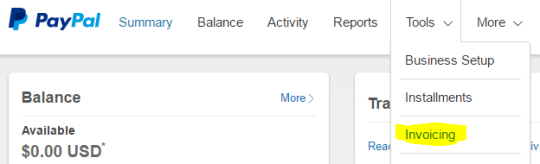
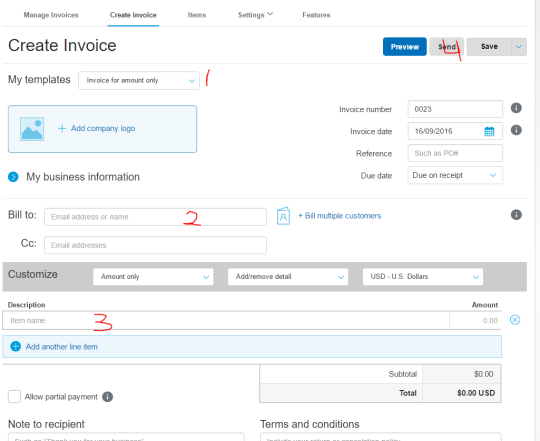
Step 1. You login and click here
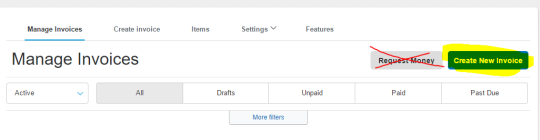
Step 2. You click create new Invoice. YOU NEVER CLICK REQUEST MONEY, unless you want to risk yourself to get scamer by buyer’s protection exploit and not only lose your money but your paypal account, and any future paypal linked to your irl name.
Step 3 You follow this steps
1. Invoice for amount only
2. Ask your client for their PayPal email and put in that field
3. Add a vague description of what you’re doing, something like “Character Coloured with Background” is good enough, and if you need more than 1 character you can type in “2″ where it says amount, or just say “2 characters”.
Warning: don’t type in “Naruto rawing Sasuke”. That will get you banned.
4. Click send.
Optional steps. Create a template, doesn’t take more than 10 minutes and it will save you a lot of time for future invoices, you can even click on “items” right next to “create invoice” and add a list of services you offer such as “character sketch” “character flats” along with a price, so next time you invoice you just add to the invoice from your list of items and you saved yourself some more time.
More importantly, you protect yourself from buyer’s protection exploit because if PayPal knows you’re doing digital goods, then you will be allowed that you did in fact created a digital good.
Keep PayPal happy, as for right now there are no alternatives to this service, and this is the only source of income for many freelancers.
Stay safe.
Heads up, all commissioning artists
I’ll be doing this from now on!
ADDING THIS BC I HATE PAYPALLLL
OK so when you send/make invoices…it doesnt let you choose ‘digital good’ or differentiate between “goods (as in physical)” and “services” (as in doesnt need address) which is what you could do with micropayments….
SO WHEN U SEND INVOICE the buyer will be asked for their shipping address. ( I even had the options turned off for shipping?? I was pretty sure there USED TO be an option that you turned off and then it wouldn’t ask for shipping, but that doesnt seem to work anymore? I went to where the setting was and still had the boxes unchecked, and yet my buyer was still getting asked to put in shipping address, and when invoice was paid, i was being asked to provide shipping label by X date or Consequences.)
SO APPARENTLY YOU HAVE TO DO THIS as the SELLER
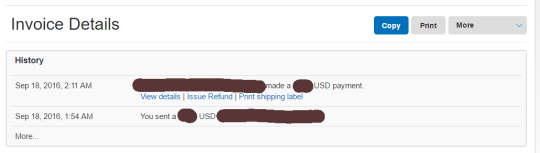
SO go to the invoice (i think this can be done BEFORE the buyer pays?? Didnt try myself tho, i did it after it was paid), and click on VIEW DETAILS in that first box
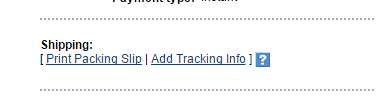
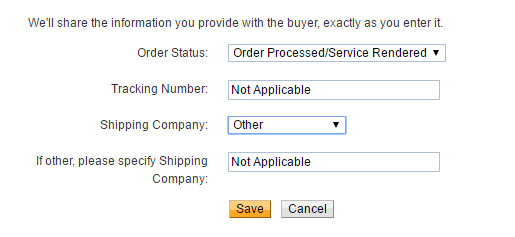
Scroll to the bottom of the page and click ADD TRACKING INFO
(YES COUNTER-INTUITIVE AS BALLLLLS.)
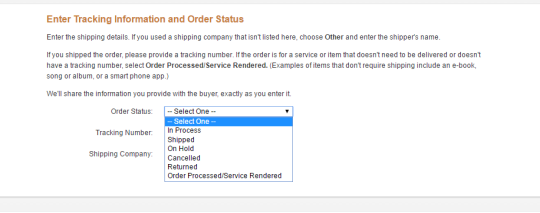
of course HERE IS WHERE YOU’RE GIVEN INSTRUCTIONS ON PROCESSING DIGITAL GOODS. HIDDEN BEHIND A BUTTON YOU WOULDNT PRESS IF YOU WERE, SAY, TRYING TO SELL DIGITAL GOODS.
Select Order Processed/Service Rendered
YAY this stuff fills itself out and you can save and not have to worry about shipping your Digital Intangible Product to a very confused seller.
I am so salt about this. excuse me while i go cry angrily.
Think I’ll reblog this for my own use…
Guess I gotta get used to sending invoices for all transactions soon then
NO EXCUSES GUYS. PROTECT YOURSELF AND OTHER ARTISTS.
PAYPAL IS TRYING TO SLIP THE RUG UNDER US. Or they may have said this and just no one read about it or noticed/knew.
OKAY SO BEFORE YOU SEND ANY MONEY FOR THAT AWESOME COMMISSION YOU WANT TO BUY FROM THAT AWESOME ARTIST. PLEASE STOP AND READ THIS.
Paypal changed the look of how you will fill out information and send money. Thus, you need to be super careful. Don’t go all willy nilly through and be like “Yeah yeah yeah send” you need to stop when you see this screen right away.
Before you proceed, you will first notice one major thing: your address is showing. What you need to do if you are ordering a DIGITAL WORK (aka, it is being sent to you via the interwebz) is you need to click on your address and there around be a drop down menu of 3 (or more) options:
No address needed
Your Current Address
+ Add a new shipping address
Be sure to select “No address needed”, it is very important that you do. If you leave your address in there, Paypal will assume that you are to receive a physical package. A physical package which needs proof that exists physically. Paypal will want the artist to provide shipping labels and tracking info on said package. This is bad, very, very bad. Artists can get in trouble if they cannot provide these things.
Please, if an artist asks to send you back your money so that you can send it again correctly, do not be offended. You are paying them to do your commission, how can they do your commission with no money?
Reblog this, send this around, if you want to make a proper tutorial go ahead, I hope this was clear enough as it is.
Important!!!
And in case the buyer does do this, there is a work around. All you have to do is click on the transaction and go to “edit tracking info” at the bottom.
Then go to order status and set to “Processed/Service Rendered.”
This will let paypal know that the order was a digital good, and no shipping was required.
You just have to check your incoming payments and make sure to do this if this does happen. Cause you aren’t notified otherwise. And you really only get in trouble if left unnoticed.
Reblogging again because I can’t stretch this enough!
emergencycommissions Not a commission post, but I think you may need this on the blog for people who are commissioning!
Yes, this is very important! I have a link to a post on our sidebar showing the same thing – this is why posts are tagged either ‘physical item’ or ‘digital file’
And they are getting even more strict when it comes to not using invoices for charging for Digital Goods.
Whatever Invoices make you uncomfortable or not, you gotta start using them if you want to keep your PayPal and your money. Changes starting this October 19th.
Honestly I don’t get why so many artists are so overwhelmed by invoices, takes just a few clicks to set up.
And is not only “oh you have to use invoices because PayPal says so” if you don’t use invoices you’re putting yourself at risk of being scammed by an user abusing the buyer’s protection.
Since PayPal ain’t got no idea of what those $50 you received were for, but the buyer is saying they didn’t got anything for the money, PayPal will just side with the buyer.
I’m seriously begging ppl, start using invoices. I’m tired of seeing ppl complain their paypal was banned, or is under investigation, or worse, the $100 they got for a very complicated commission, 3 months later get a refund issue.
just
start
using
invoices
for your own sake.
Here is how you use invoices because I can’t keep playing devil’d advocate, yes I would love to help you get your PayPal restored but just this last month I had to help three persons, and they were MORE than aware of this issues.
Just protect yourself.
Step 1. You login and click here
Step 2. You click create new Invoice. YOU NEVER CLICK REQUEST MONEY, unless you want to risk yourself to get scamer by buyer’s protection exploit and not only lose your money but your paypal account, and any future paypal linked to your irl name.
Step 3 You follow this steps
1. Invoice for amount only
2. Ask your client for their PayPal email and put in that field
3. Add a vague description of what you’re doing, something like “Character Coloured with Background” is good enough, and if you need more than 1 character you can type in “2″ where it says amount, or just say “2 characters”.
Warning: don’t type in “Naruto rawing Sasuke”. That will get you banned.
4. Click send.
Optional steps. Create a template, doesn’t take more than 10 minutes and it will save you a lot of time for future invoices, you can even click on “items” right next to “create invoice” and add a list of services you offer such as “character sketch” “character flats” along with a price, so next time you invoice you just add to the invoice from your list of items and you saved yourself some more time.
More importantly, you protect yourself from buyer’s protection exploit because if PayPal knows you’re doing digital goods, then you will be allowed that you did in fact created a digital good.
Keep PayPal happy, as for right now there are no alternatives to this service, and this is the only source of income for many freelancers.
PAYPAL IS TRYING TO SLIP THE RUG UNDER US. Or they may have said this and just no one read about it or noticed/knew.
OKAY SO BEFORE YOU SEND ANY MONEY FOR THAT AWESOME COMMISSION YOU WANT TO BUY FROM THAT AWESOME ARTIST. PLEASE STOP AND READ THIS.
Paypal changed the look of how you will fill out information and send money. Thus, you need to be super careful. Don’t go all willy nilly through and be like “Yeah yeah yeah send” you need to stop when you see this screen right away.
Before you proceed, you will first notice one major thing: your address is showing. What you need to do if you are ordering a DIGITAL WORK (aka, it is being sent to you via the interwebz) is you need to click on your address and there around be a drop down menu of 3 (or more) options:
No address needed
Your Current Address
+ Add a new shipping address
Be sure to select “No address needed”, it is very important that you do. If you leave your address in there, Paypal will assume that you are to receive a physical package. A physical package which needs proof that exists physically. Paypal will want the artist to provide shipping labels and tracking info on said package. This is bad, very, very bad. Artists can get in trouble if they cannot provide these things.
Please, if an artist asks to send you back your money so that you can send it again correctly, do not be offended. You are paying them to do your commission, how can they do your commission with no money?
Reblog this, send this around, if you want to make a proper tutorial go ahead, I hope this was clear enough as it is.
Important!!!
And in case the buyer does do this, there is a work around. All you have to do is click on the transaction and go to “edit tracking info” at the bottom.
Then go to order status and set to “Processed/Service Rendered.”
This will let paypal know that the order was a digital good, and no shipping was required.
You just have to check your incoming payments and make sure to do this if this does happen. Cause you aren’t notified otherwise. And you really only get in trouble if left unnoticed.


I had already finished it, it was full color, 6 panels and had a full bg in every panel. I was lucky in that I didn’t spend him money yet, but it left me without funds. I’ve also had the above happen to me as well.




 backup